Regular progress checkpoints that show how a student is developing and what to work on next.
What to do now: Keep training regularly. Open your child’s record in the Members Area to see which Review they are working towards and whether it is available to book. Check progress
Parents and carers
The three-Review route
Coloured-belt students normally need all three successfully completed Reviews during the training year to receive their July Belt Promotion invitation. Reviews and Belt Promotion are separate stages: completing Reviews does not automatically guarantee promotion. Booking each Review is invitation-based, with required attendance met before the booking cut-off.
There is normally one Review opportunity in each term: Winter (September–December), Spring (January–March) and Summer (April–June). The training year runs from 1 September to 31 August; progress and Review attendance reset on 1 September.
How Coloured Belt Reviews work
Once a student becomes a coloured belt, they need three successfully completed Reviews in each training year. These are normally the Winter, Spring and Summer Reviews.
You do not need to calculate progress yourself. Open your child’s member record and look for their Review progress and available bookings. The Members Area is the source of truth for their current stage.
Train regularly
Regular attendance builds Review progress.
Unlock and book
When progress is complete, book and purchase the Review in the Members Area.
Attend the Review
Take part in the separate, supportive Review session.
Find out your progress
Receive a Pass, Merit or Distinction result and feedback on what to work on next.
Start the next cycle
Attendance starts again for the next Review. Sessions used for one Review cannot be counted again for another.
The cycle repeats: keep training through each Review until the required Reviews for the training year are complete.
Review 1 of 3 journey
Review 1 of 3
Review 2 of 3
Review 3 of 3
Reviews complete ✓
Invitation follows
Each Review is a separate stage. After attending a Review, progress begins towards the next Review. Completing Review 1 does not mean all Reviews for the year are complete.
Statuses you may see
Training in progress
Review available to book
Review booked
Review completed
Reviews complete – invitation to follow
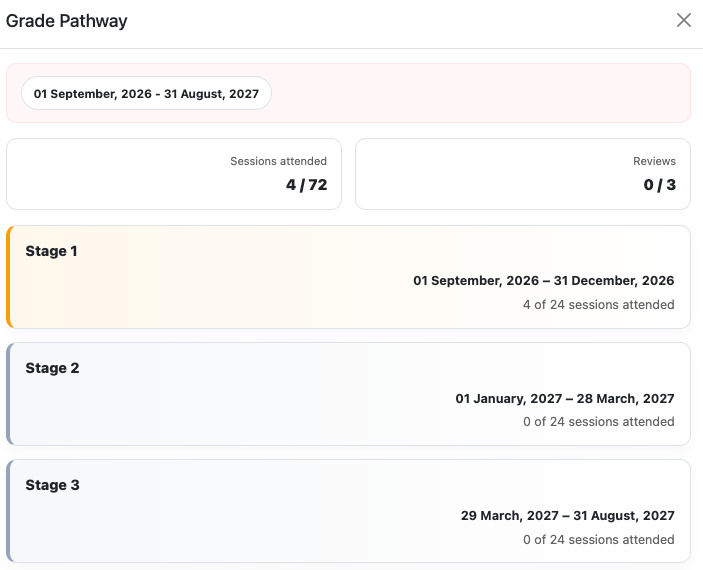
Understanding your Grade Pathway
The Grade Pathway view in the Members Area shows the member’s training-year totals and attendance for each Review stage. Check the dates and targets on your own member’s record.
An example pathway with a 24-session target per stage. Dates and attendance targets depend on the member’s pathway; use your own record for current information.
Sessions attended — 4 / 72: four sessions recorded against the combined attendance target shown across the three stages.
Reviews — 0 / 3: none of the three required Reviews has yet been recorded as completed.
Stage 1 — 4 of 24: four sessions recorded towards that stage’s attendance target.
Stages 2 and 3 — 0 of 24: no sessions recorded for those stages in this example.
The 24-session target is the Brown / Brown Stripe attendance requirement. Other belts have different targets: see the qualifying attendance table. The overall total does not replace the requirement to qualify for and successfully complete each Review separately.
The dates shown are pathway windows, not confirmed Review appointments. Follow the invitation, booking cut-off and event date in the Members Area. Reaching a session target does not mean the Review has been completed or a belt awarded.
White–Green members can meet the requirement through normal weekly attendance. Blue / Purple members are expected to train approximately twice per week; Brown / Brown Stripe approximately three times per week. These are expected frequencies, not a contractual requirement to attend an exact number every week. To become eligible, the minimum number of qualifying regular class sessions must be recorded before the Review booking cut-off:
See the definitive qualifying attendance table for the minimum sessions required at each belt level. Membership entitlement does not replace actual qualifying attendance.
These are minimum eligibility thresholds, not maximums. Keep attending normal classes after the threshold is reached. Attendance completed after the booking cut-off normally counts towards the next Review cycle.
White Belt path
White Belts need one successfully completed Review during the training year. They do not need three in their first White Belt year.
Coloured Belts need three successfully completed Reviews during the training year. Attendance must be earned separately for every Review cycle.
Training year: 1 September to 31 August. Review progress begins fresh each new training year. Historical Reviews and previously achieved belts remain part of the member’s record.
What counts as attendance?
Only attendance at regular timetable classes normally counts. This includes the member’s assigned class and a regular class formally assigned through Temporary Class Change.
Reviews, Belt Promotions, competitions, courses, seminars and special events under Bookings do not normally count. An unassigned class does not normally count, so members should not attend classes they have not been assigned to.
Membership access is not attendance. Paying for one, two or three classes per week does not automatically meet the requirement. Only qualifying sessions actually attended and recorded count.
Review results
The result is Pass, Merit or Distinction. All three mean the Review has been successfully completed. Merit and Distinction recognise a higher overall standard shown at that Review; they do not create a different Belt Promotion outcome or extra progression advantage.
What happens next?
Competition is not a general requirement for belt progression. ZKS may offer an invited competition-based opportunity for eligible students. Your invitation or Members Area information will explain whether this applies.
Reviews complete
The required Reviews have been recorded.
Invitation details follow
Members who meet the requirements are invited to the appropriate progression event.
Book and purchase
Follow the information in the Members Area.
Complete the next event
Attend coloured-belt promotion in your normal class after invitation and purchase, or attend the separately booked and purchased Junior Black Belt Grading.
Completing the required Reviews determines eligibility to attend the next progression event; it does not guarantee a new belt. Most eligible members are invited to Belt Promotion and must still attend and complete that process.
Brown Stripe members also need three Reviews, but their next event is the Junior Black Belt Grading rather than the normal Belt Promotion. This is a more comprehensive grading covering techniques and knowledge developed throughout their ZKS training.
Questions about your child’s record or Review progress?
If you believe your child’s Review record or progress information is incorrect, please send a message through the Members Area for the relevant member and ask us to check it. Include the Review date or dates and a short explanation of what you believe is wrong. Please wait for a response before booking.
This is a request to check the information and does not guarantee a different decision.
Check your child’s Review progress in the Members Area first. If the answer is not clear, send a message through your child’s member record with the relevant Review dates and details, then wait for a response before booking.